
How to manage standard & sensitive cases
Standard case
The support team works together with the review team in order to get more positive reviews. The support team writes a friendly reminder to each guest to leave a review on the platform which the guest booked through (the team gets a reminder of the guests check-outs).
The review from our side is normally automatic for Airbnb and vrbo (Homeaway and Abrietel) unless it’s manually done or it’s a sensitive case (when the tag is added, the support team needs to pause the automation). The automatic review process takes 6 days, so it's better to do it manually before if there is time. More reviews, more visibility!
The idea is that the review team answers to all the very bad reviews and if there is time, also to all the good ones. If a case is very sensitive, we try to prevent the very negative feedback within the tag system “Review attention” given by the support team directly on the reservation data on Bookingsync. Check the Sensitive case paragraph to understand how to deal with it.
There are 3 scenarios that can happened, the guests have left a review already, the guests haven't left a review and when you just need to leave a public response (in this case the guests have left a review already and the automated process did it too)
Check the credentials you need to log in into the different platforms we have. Please note that not on all the platforms you can leave a review.
1. What to do in case the guests have already left a review:
Airbnb: You see this message on the right side of the chat with the guest "Ophelie wrote you a review. You have 13 days..." as the example here on the side.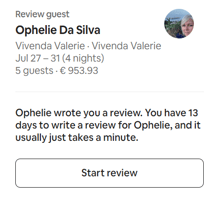
- Start the review for the guest (Leave the rating 1 to 5 depending on case, always check the chat history to have an idea about how the whole stay went)
- Leave a public review to the guest and the private message to the guest (Include some personal details)
- Once it's done, the guest review will be visible to us
- Go back to the guest chat and click on the "show review" on the right side as per screenshot below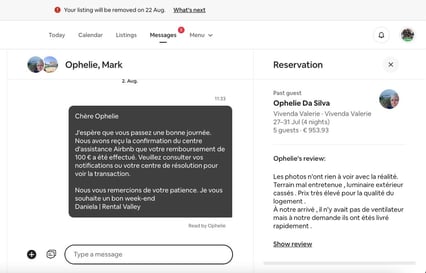
- You will be directed to the "review details" page to see the public and the private guest note. At this point please collect the feedback the guest left for our property, in this case "Vivenda Valerie"
- Click on "Reply to Belinda" and then search the name guest in the past reviews list and submit your public response, as per example here below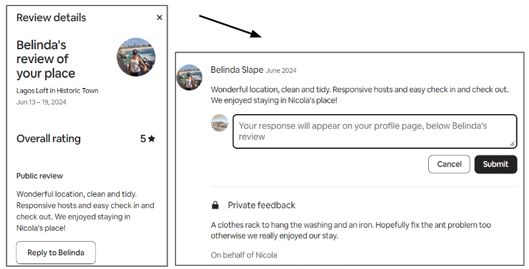
Writing the reply: Get something personal from their profile/history and leave them a nice public answer. Check with Chatgpt to help you writing an answer, pasting the client review.
Always put at the end the greetings, your name | Rental Valley, for example:
Warm regards, Elisa | Rental Valley or Best regards, Sonia | Rental Valley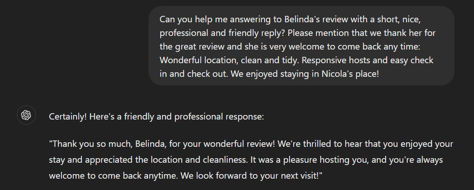
Please edit some bits to make it more personal and less AI. For example in this case, assuring her that we have taken in consideration her feedback it's important to show her that we are serious about it and the guest might come back as well. Check how to collect feedback as an example of this case. 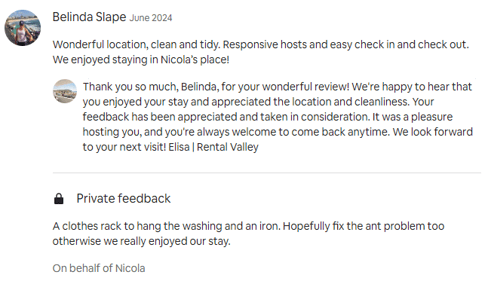
Booking.com: If the guests have left a review, you will be able to see it in the last reviews of the properties. In this case you can just collect the feedback as on this platform is not possible to leave a review.
2. What to do in case the guests haven't left a review
If the guest haven't made a review yet, make one first and remind them to leave one.
Airbnb: You see this message on the right side of the chat with the guest "You have 12 days left..."
- Check the history of the booking to understand if it's a standard case or sensitive that might end up with a bad review. If it's a standard one, "Start review" and write them a nice message reminding to leave a review that their feedback is valid to us. (@sonia example needed?)
If it's a sensitive case, see next paragraph. 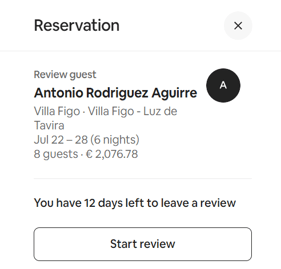
Booking.com: If the guests haven't left a review, you will not be able to see it in the last reviews of the properties. In this case, check the messages and to understand if it's a standard case or sensitive one that might end up with a bad review. If it's a standard one, write them a nice message reminding to leave a review that their feedback is valid to us. If it's a sensitive case, see next paragraph.
3. What to do in case you need to leave a public response (only Airbnb)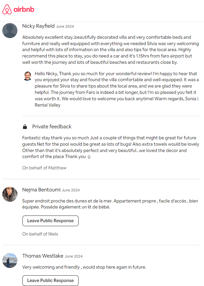 Get something personal from their profile/history
and leave them a nice public answer. Check with Chatgpt to help you writing an answer, pasting the client review. As the previous example, for writing the reply, the procedure is the same one.
Some investigation might be needed in order to provide a personal answer and the feedback might be need to be collected anyway.
Extra if there is time: Check and submit 3/4 previous Public Response from this list one the side.
Sensitive case
It can happen that the guests are not happy about their stay, in this case the support team leaves the “Review attention” tag when they think the guest might leaves a bad review*.
The goal of the review team at this point is to try to mitigate the case to avoid a very bad review. When the tag is added, the review team gets a notification email on the day of the guest check-out. The notification arrives on the review@rentalvalley.com email with the guests booking info from BookingSync.com (Log in into it with shortstay+bookingsync.com@rentalvalley.com)
*Support team should leave a quick summary/small comment of the issue that occurred and also pause the automatic review. If not, please notify Annemarie with a screenshot via email. 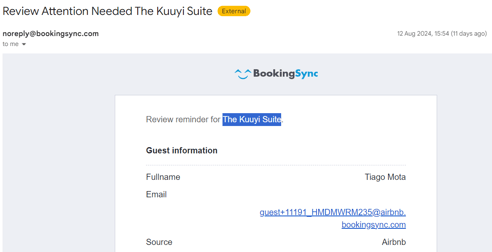
Step by step how to deal with a sensitive case
Once you get the notification, check which platform the guest booked the stay and open Bookingsync to read the summary of the issue that occurred:
Calendar > Property name > Select the check out day on the right side (See example below)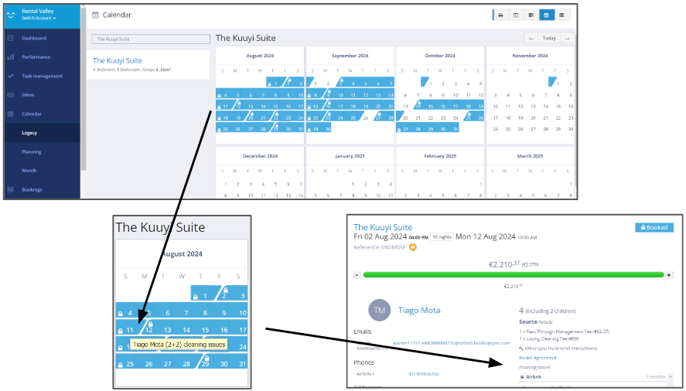
Investigate: You should see a very quick summary on the booking info, under the "Rental agreement" as per example above (where the last arrow ends). Open the platform, in this case was Airbnb (check the log-in credentials) and simply try to quickly understand the situation. If you do not understand you can check the case with one of the seniors: Alvaro, Daniela and Manouk.
Check the “Support dashboard” to see if a case has been filled already. Put the case in the compensation tab if you think they deserve it and make sure Annemarie knows so she can make the call. (She normally checks it within 2 days, then one of the senior will communicate the resolution to the guest)
Text the guest that financial compensation is on its way and/or the case has been escalated for a further evaluation. Check with Chatgpt for a correct and personal correction to the text you want to write, and check with Sonia on messages. (@sonia example needed)
If it's an urgent case, message Annemarie.
Same as in the standard case, there are 3 scenarios that can happened, the guests have left a review already, the guests haven't left a review and when you just need to leave a public response (in this case the guests have left a review already and the automated process did it too, even though this scenario shouldn't happened but sometimes a guest does not communicate at all and nobody expect a bad review)
1. What to do in case the guests have already left a review:
Airbnb: We arrived too late!
- Make the review with a sensitive touch if the case is very very bad. In case is a not justified review, don't be sorry for everything. Check what they left and write the answer. (@sonia example needed)
- Collect feedback
Booking.com: If the guests have left a review, you will be able to see it in the last reviews of the properties. In this case you can just collect the feedback as on this platform is not possible to leave a review.
2. What to do in case the guests haven't left a review
If the guest haven't made a review yet, make one first and remind them to leave one.
Airbnb: We might be able to mitigate the situation!
- After the investigation, depending on the case you might need to leave a nice message saying that we are sorry and mentioning that the case has been escalated in order to get a compensation to cover what happened (@sonia examples needed as I think these are the most important)
- Collect feedback
Booking.com: Same as Airbnb, without mentioning that we left them a review.
3. What to do in case you need to leave a public response (only Airbnb)
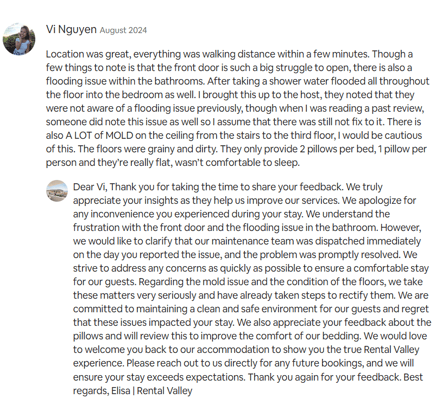
Investigate on what happened and the reason for their feedback. Check the rental guide as well if they complained about something that was easy to find in there and they just didn’t see/read it or maybe it’s not explained well from our side there. Once you have an idea of what’s going on, answer their review in a personal, professional and a bit friendly way. Some clients are not collaborative and despite our effort will write a really bad review, highlight our positive points in this case. Example:
Main platforms credentials:
- Airbnb.com - (Guest review possible)
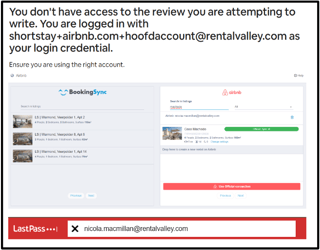
Use shortstay+airbnb.com+hoofdaccount@rentalvalley.com go to messages and search for the guest name. You should be able to understand what's going on reading the chat. If the general aribnb account doesn’t work you need to log in with the owner account. To do so, go to bookingsync, apps, airbnb.com and search in listings for the property. Copy the email address of the owner and then go to last pass to get the password.
- Booking.com - (Guest review not possible)
Use support+booking.com@rentalvalley.com account
- Vrbo - (process to be created)
Use shortstay+homeaway.com@rentalvalley.com account
- Smily - (Guest review not possible) (process to be created)
- Our website - (Guest review not possible) (process to be created)
- Holidu - (Guest review not possible) (process to be created)