
See the info and link below to see details about changes, cancellations etc for HomeToGo bookings.
In order to cancel a booking you need to contact the HomeToGo team on this email address partnerrelations@hometogo.com and they will cancel it for you. You can't cancel or change the booking from your Bookingsync account.
When the guest cancel, cancellations are automatically synchronized from HomeToGo to your channel manager. If we receive a cancellation email in CM, check if the booking was cancelled in the cancellation policy. If it is not and the guest doesn't get any money back you can archive the email. If the guest cancels in the policy, we need to remove the payment manually out of Bookingsync.
This is how you do that:
When you have the booking in front you will see a little plus sign, please click on that:
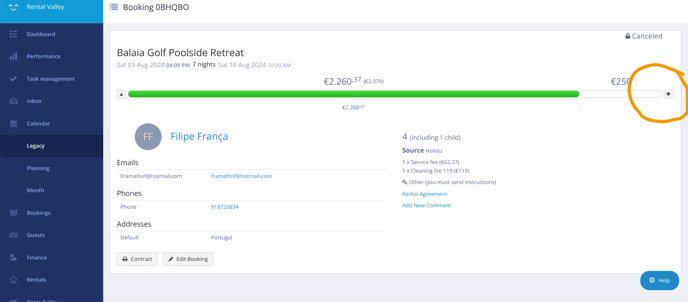
After unfolding, fill in online, the minus amount of the total and in notes the date the cancellation was done. And press save, if all goes well the green line goes away. 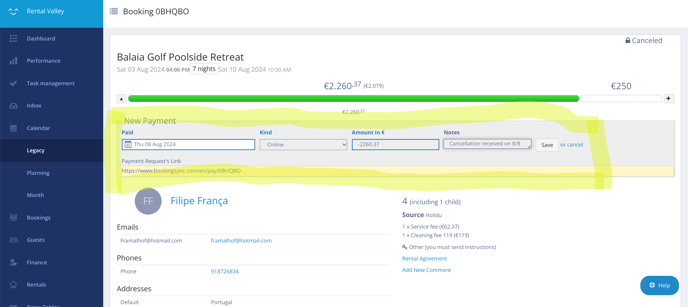
Hometogo has a new feature that the properties that are only bookable on request can also be listed on the platform. We have now therefore also 'Request to Book' properties live on the Hometogo platform, what does this mean for the booking process?
- The traveller sends a booking request on Hometogo.
- The PM receives the booking request in their bookings in Bookingsync as "Tentative" and need to confirm availability or reject the request by editing the booking (click on EDIT booking)
- If the PM confirms the availability, the traveller is asked to complete the payment by Hometogo to finalise the booking. Once the payment is made, the booking is confirmed in Bookingsync.
- If the PM hasn't taken any action, the booking is automatically cancelled after 24 hours.
- If the PM rejects the availability, the booking request is cancelled.
More details for HomeToGo reservations:
https://manual.bookingsync.com/hc/en-us/articles/10640212696733-How-to-publish-your-listings-on-HomeToGo-from-your-Smily-account